 Instructions
How to duplicate a Notion template
Everything you need to get a template into your own Notion workspace and start using it straight away. Five steps, about two minutes, nothing to download and nothing to install.
Do not miss out: Get the Notion Business plan for FREE + full AI access. No credit card required (up to $6k savings).
This exclusive offer will not last long. Start your free trial today ↓
You need a Notion account to duplicate a template, and the free plan is enough for every template here. A business email is required for the Business offer and it is subject to Notion's approval. Affiliate link: it costs you nothing and supports the templates.
How to duplicate your template
Open your access link
Open the template from the direct link button, or from the link inside the PDF you received. The same link arrives by email from [email protected]. Keep that email: it is your proof of purchase and your route to future updates.
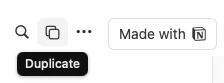
Click Duplicate
The template opens in Notion as a read-only preview. Press Duplicate or Start with Notion in the top right-hand corner of the screen.
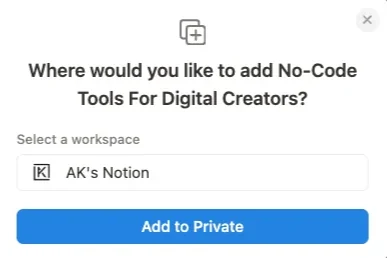
Choose your space and add it
Notion asks where to put it. Select your space, then click Add to Private. If you belong to more than one workspace, pick the one you work in daily rather than a personal one you will abandon.
Wait a few seconds
The template appears under the selected workspace in your sidebar. Large templates with many databases take a little longer, so give it a moment before assuming something went wrong.
That is it. The template is yours forever
The copy is not shared with me, I cannot see it, and nothing syncs back. Rename it, delete half of it or restructure it entirely.
Start with the Read Me First section at the top of every template. It says which databases matter and what to fill in first. Ten minutes there saves an hour of guessing.
Common questions
Do I need a paid Notion plan?
No. The free plan covers every template in the shop. Paid plans add team features you do not need to run a duplicated template on your own.
What if I already have my own pages in Notion?
The duplicate lands alongside them without touching anything. Move it into any section afterwards, or drag pieces out of it and leave the rest.
Can I use it on mobile?
Yes. Every template works in the Notion mobile app.
Do I get updates?
Yes, and they are free. When a template is improved I email the new duplication link. Your existing copy is untouched, so you choose whether to move across.
Can I share it with my team?
Yes, inside your own organisation. Share it the way you share any Notion page. Reselling it or redistributing it publicly is not permitted.
The Duplicate button is not there.
You are almost certainly signed out. Sign in to Notion in the same browser tab, reload the template link, and the button appears in the top right.

Hi there
Thank you for downloading the template. If anything is unclear, tell me and I will fix it. Feedback is what keeps these templates sharp.
Stay ahead
Get proven strategies and template updates sent straight to your inbox.
Get free updates Browse the templates