In your own workspace in about two minutes
No account to create on this site, nothing to download, nothing to install. You get a link, you click it once, and the template is in your own Notion workspace where you can change anything you like.
New to Notion, or still on the free plan? You need a Notion account to duplicate a template, and the free plan is enough for every template here.
If you run a startup or a business, my partner link also gets you up to 3 months of Notion Business free, with Notion AI included: claim the offer here. A business email is required and it is subject to Notion's approval. (affiliate link)
Open your access link
Your link appears on the confirmation screen at checkout, and the same link arrives by email from admin@anthonytoday.com. Either one opens the template. Keep the email: it is your proof of purchase and your route to future updates.
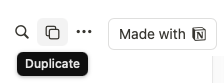
Click Duplicate
The template opens in Notion as a read-only preview. Press Duplicate or Start with Notion in the top right-hand corner of the screen.
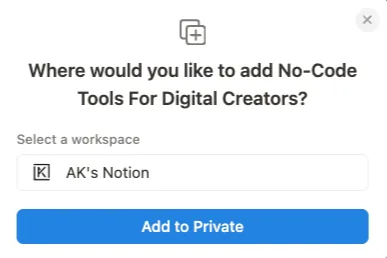
Choose your space and add it
Notion asks where to put it. Select your space, then click Add to Private. If you belong to more than one workspace, pick the one you actually work in rather than a personal one you will abandon.
That is it
After a few seconds the template appears under the selected workspace in your sidebar. It is yours forever. The copy is not shared with me, I cannot see it, and nothing syncs back, so rename it, delete half of it or restructure it entirely.
Start with the Read Me First section at the top of every template. It says which databases matter and what to fill in first. Ten minutes there saves an hour of guessing.
Common questions
Can I use it on mobile?
Yes. Every template works in the Notion mobile app. Product pages show mobile screenshots so you can see how it behaves on a phone before buying.
What if I already have a Notion workspace with my own pages?
The duplicate lands alongside your existing pages without touching them. You can move it into any section afterwards, or drag pieces out of it and leave the rest.
Do I get updates?
Yes, and they are free. When a template is improved I email the new duplication link. Your existing copy is untouched, so you choose whether to move across.
Can I share it with my team?
Yes, inside your own organisation. Share it the way you share any Notion page. Reselling it or redistributing it publicly is not permitted.
What if it is not right for me?
Reply to the delivery email within 14 days and I refund it, no questions asked.
I want it set up for my business, not just handed over.
That is consulting, not a template. Answer six questions about what you are trying to run and I will tell you straight whether it is a fit, and book a call if it is. Start here. Prefer to just talk? A 30-minute call is $79.